Enhancing your reports
The monthly report is often the main touchpoint between a consultancy, an asset manager or a family office and its clients. It's where investors check how much they have, how much they earned and how their portfolio compared to the market. That's why every number has to be right and has to agree with the other numbers on the page.
Below we'll explore the use case tailored to companies that seek to transform their clients' transactional data into clear, consistent investment reports, produced at scale.
Numbers that add up
A report shows the same wealth from several angles: the month's result, the return compared to the CDI, the allocation by asset class and the cash movements. When these numbers come from scattered spreadsheets and calculations, it's common for one block not to match another, and clients notice.
With GorilaCORE, every block of the report comes from the same calculation engine, based on the same transactions and the same prices. The month's return, the result in reais and the closing NAV agree with each other, and security events (dividends, interest, amortizations, splits) are already accounted for, with no need to handle them one by one.
And if a past transaction is corrected, the metrics are recalculated: the next report comes out with the right numbers, with no manual rework.
From month close to delivery
Generating one report is easy; generating hundreds of them every month, right after the month closes, is another story. Every portfolio needs up-to-date prices, events and positions before the first PDF is generated.
GorilaCORE processes more than one million portfolios daily, and the metrics of each one are available through the API. Your reporting routine comes down to querying the numbers and filling them into your own template, with your brand.
Using GorilaCORE to build a monthly report
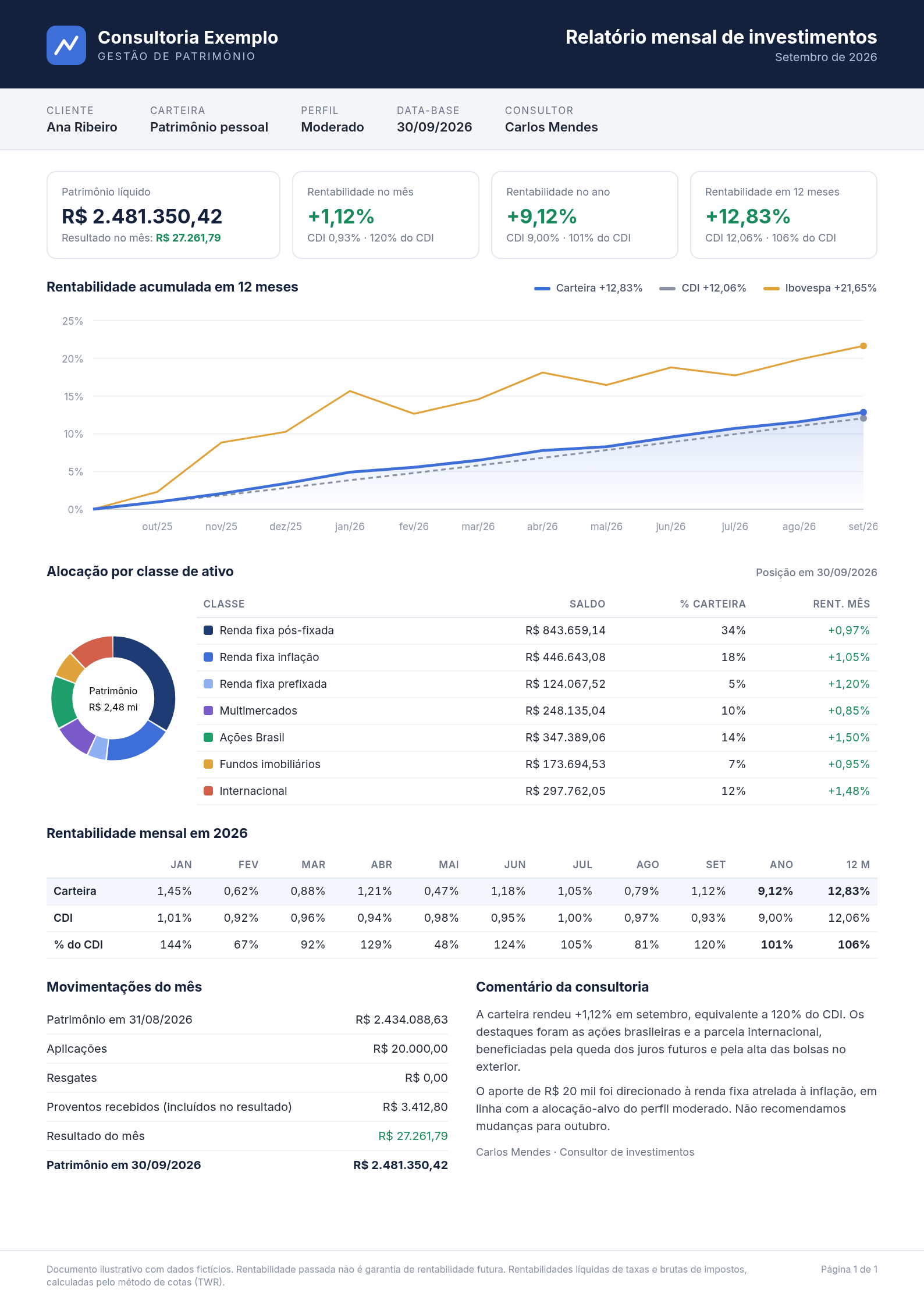
Let's build, block by block, the simplified report below (in Portuguese), from a fictional consultancy, for September 2026.
We start from a portfolio that already has transactions. If you're not there yet, see how to create the organization and the portfolios and insert transactions in Building an application and, with code blocks, in our Quick Start guide.
Header
The portfolio name and the client's profile come from the Portfolio itself: query Read Portfolio and use the name and investmentProfile.name fields (the Investment Profile associated with the portfolio). The client and advisor data live in your system, mapped to the portfolioId.
Key indicators
The first block summarizes the portfolio on the reference date:
- NAV: the portfolio's Net Asset Value (NAV) on 2026-09-30, from Read Net Asset Value.
- Result for the month: the Profit & Loss from 09/01 to 09/30, from Read Profit & Losses. Set the frequency to
INTERVALto get a single value for the whole month. - Return for the month, the year and 12 months: the Time-Weighted Return (TWR) of each period. You don't need one request for each: the queries of the next blocks already bring these values, as we'll see below.
Next to each return, the report shows the CDI for the same period and the percentage of the CDI, which is simply the ratio between the two returns.
12-month cumulative return
The chart compares the portfolio with two Benchmarks, the CDI and the Ibovespa. For that, we need three series with the same parameters.
First, we query the portfolio's TWR from 2025-10-01 to 2026-09-30, with frequency=MONTHLY and seriesType=ACCUMULATED: each point is the cumulative return up to the end of the month. Besides the series, the response brings the interval field, with the TWR of the whole period: that's the 12-month return of the key indicators block.
Then, we find the CDI and Ibovespa IDs in List Benchmarks (with the search parameter) and query each series in Read Benchmark by ID, with the same period, frequency and series type.
With the three series in hand, just pick your favorite charting library.
Allocation by asset class
For the donut chart and the table, we use the Market Value endpoint, List Position Market Values, on the reference date (referenceDate). There's no need to add up positions manually: with the groupBy parameter set to a classification level (for example, CLASSIFICATION_L1), the response already brings the market value summed by class. Each class's percentage is its value divided by the total of the groups.
The month's return column comes from List Position Time-Weighted Returns, with the same groupBy and the period from 09/01 to 09/30: the response brings each class's TWR for the month.
The classes in this report are the consultancy's own, not necessarily Gorila's. If that's your case, create custom classifications and reclassify the securities: the groupings will follow your class tree, in every portfolio of your organization. To display each class's name, query the classifications in List Security Classifications.
Monthly returns
The table shows the return of each month of the year, compared to the CDI. We query the portfolio's TWR from 2026-01-01 to 2026-09-30, now with frequency=MONTHLY and seriesType=PER_PERIOD: each point is the return of that month alone. We do the same for the CDI in Read Benchmark by ID.
This query completes the key indicators block: the last point of the series is the return for the month, and the interval field is the return for the year. The 12-month column already came from the chart query.
Cash movements
This block explains how the NAV went from one value to the other:
- Opening and closing NAV: query the NAV from 08/31 to 09/30. The first point of the series is the NAV at the end of the previous month, and the last one is the NAV on the reference date.
- Investments and withdrawals: query the month's transaction list to measure purchases (inflows) and sales (outflows).
- Income received: query the month's Portfolio Security Events in List Security Events and add up the received value (
receivedValue) of cash events, such as dividends (CASH_DIVIDEND), interest on equity (CASH_JSCP) and income (CASH_INCOME). Each event brings the ex date (eventDate) and the payment date (paymentDate); choose which one defines the month in your report. Income is already part of the month's result, so it's shown for information only. - Result for the month: the same P&L of the key indicators block.
It all adds up: the closing NAV equals the opening NAV, plus investments, minus withdrawals, plus the month's result. In the example, BRL 2,434,088.63 + BRL 20,000.00 + BRL 27,261.79 = BRL 2,481,350.42.
Commentary and footer
The commentary is written by the consultancy, but the data helps: the TWR of each position for the month, grouped by security (groupBy=SECURITY_ID), shows which investments stood out.
The footer states that returns are calculated with the quota method (TWR) and are gross of taxes. In GorilaCORE, the TWR deducts transaction costs and never deducts taxes on gains; see the return basis to choose between GROSS_UP and GROSS.
Wrap-up
We've explored how to build a monthly report with GorilaCORE, but you can go much further! For clients with several portfolios, the same indicators are available for an Economic Group, consolidating everything into a single report. You can also add the portfolio's compliance with the client's profile using the target allocation, a risk block with Drawdown, Volatility and Sharpe, or the IRR to show the financial return the investor actually obtained.
Contact us if you have any doubts about how to get started.